> ## Documentation Index
> Fetch the complete documentation index at: https://docs.envoi.no/llms.txt
> Use this file to discover all available pages before exploring further.
# Auditor and SAF-T
> Download the SAF-T file, and check that the books have not been altered.
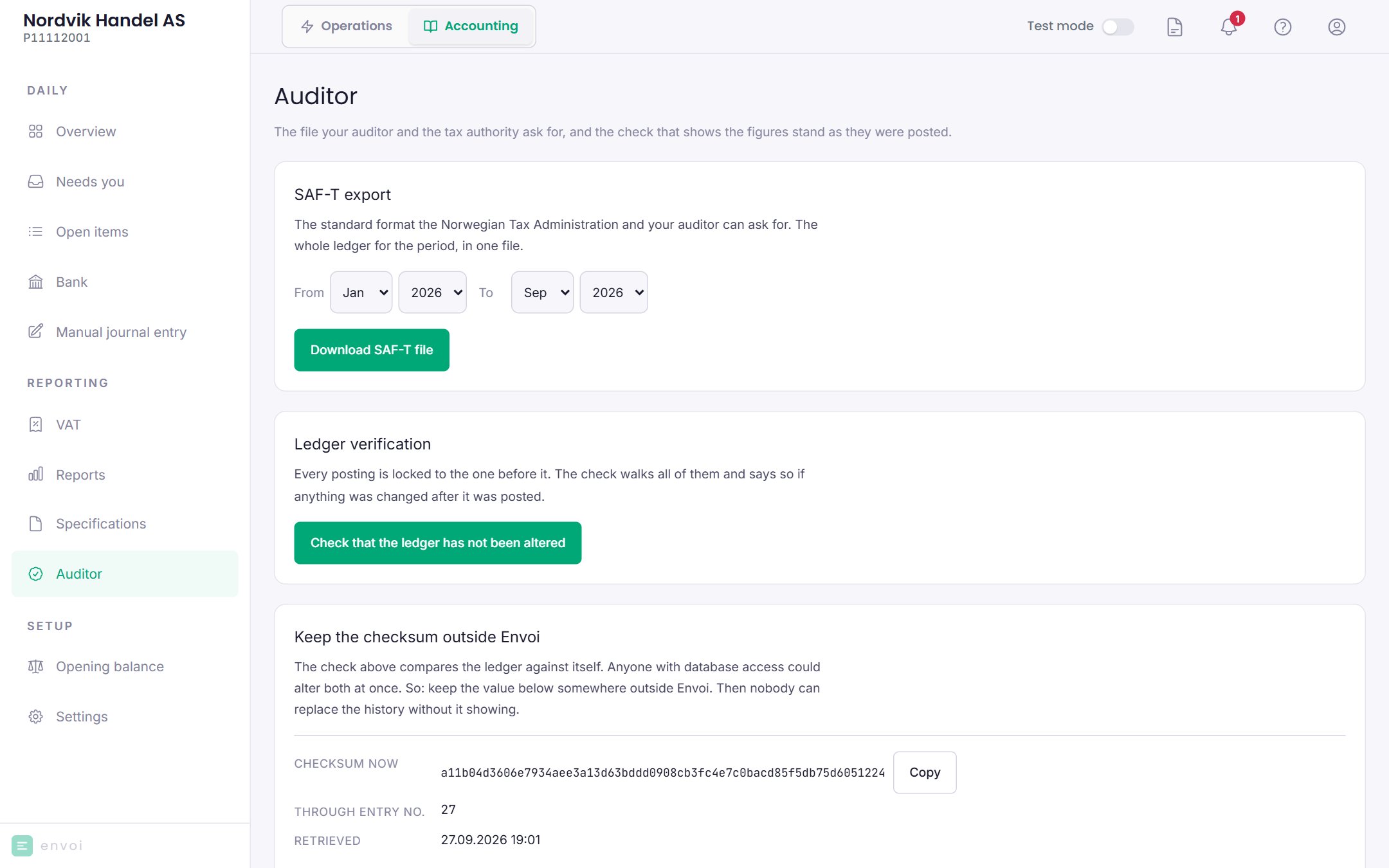
**Auditor** has the file your auditor and the Norwegian Tax Administration (Skatteetaten) ask for, and the check that shows the figures stand as they were posted.
 ## Download SAF-T
SAF-T is a standard file format for accounting. Envoi creates the file in version 1.40, which is the format Skatteetaten requires from 1 January 2027.
Choose the **From** and **To** month. The period can span several years.
Choose **Download SAF-T file**. The file is downloaded, and Envoi shows the file name and a checksum.
The file contains the chart of accounts, customers, suppliers, the VAT codes and all postings in the period. It is named `saf-t_organisasjonsnummer_fra-til.xml` (organisation number, from, to), for example `saf-t_112233458_202601-202609.xml`.
* Envoi does not send the file anywhere. You give it to your auditor, accountant or Skatteetaten yourself.
* Every download from here is logged in the books.
* The same period gives the same checksum every time, so the recipient can see that the file has not been changed.
## Check the books
Choose **Check that the ledger has not been altered**. Envoi goes through all postings and checks that they stand as they were posted.
* **Nothing has been altered**: everything is in order.
* **The ledger has been altered after posting**: stop, and contact your auditor and [support@envoi.no](mailto:support@envoi.no).
## Keep the checksum
Under **Keep the checksum outside Envoi** you see a checksum for the entire books as they are now. Copy it and store it somewhere outside Envoi, for example in a password manager or an email to yourself, ideally once a year. You can then show later that the books have not been changed since.
## Download SAF-T
SAF-T is a standard file format for accounting. Envoi creates the file in version 1.40, which is the format Skatteetaten requires from 1 January 2027.
Choose the **From** and **To** month. The period can span several years.
Choose **Download SAF-T file**. The file is downloaded, and Envoi shows the file name and a checksum.
The file contains the chart of accounts, customers, suppliers, the VAT codes and all postings in the period. It is named `saf-t_organisasjonsnummer_fra-til.xml` (organisation number, from, to), for example `saf-t_112233458_202601-202609.xml`.
* Envoi does not send the file anywhere. You give it to your auditor, accountant or Skatteetaten yourself.
* Every download from here is logged in the books.
* The same period gives the same checksum every time, so the recipient can see that the file has not been changed.
## Check the books
Choose **Check that the ledger has not been altered**. Envoi goes through all postings and checks that they stand as they were posted.
* **Nothing has been altered**: everything is in order.
* **The ledger has been altered after posting**: stop, and contact your auditor and [support@envoi.no](mailto:support@envoi.no).
## Keep the checksum
Under **Keep the checksum outside Envoi** you see a checksum for the entire books as they are now. Copy it and store it somewhere outside Envoi, for example in a password manager or an email to yourself, ideally once a year. You can then show later that the books have not been changed since.