> ## Documentation Index
> Fetch the complete documentation index at: https://docs.envoi.no/llms.txt
> Use this file to discover all available pages before exploring further.
# Projects
> Collect hours, materials and costs on a project, follow the margin and invoice.
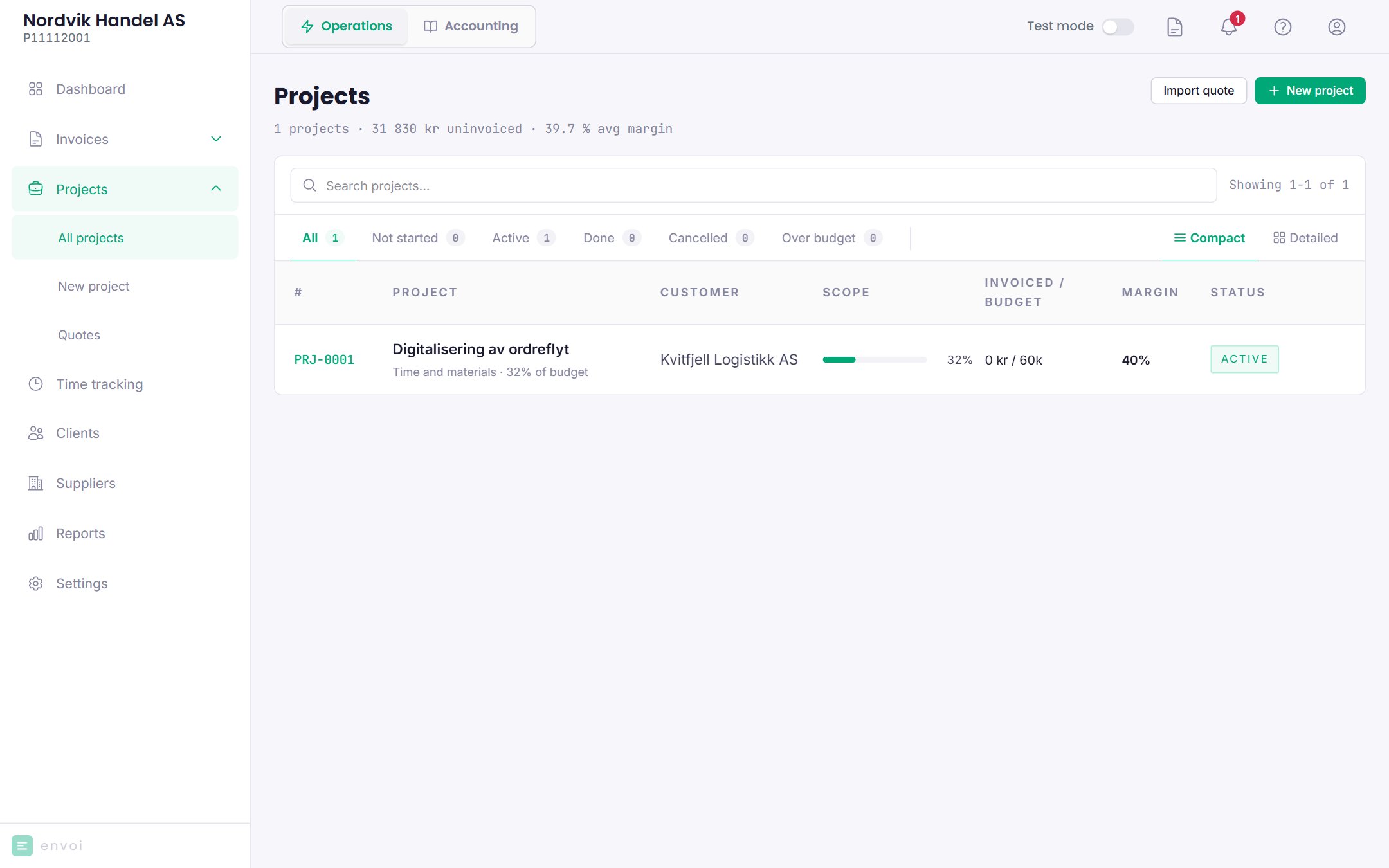
A project collects what belongs to one job: hours, materials, other costs and supplier invoices. You see what the project has cost and earned, and invoice from the project.
You find the projects under **Projects**.
 ## Project types
When you create a project, you choose a type. The type decides how the project is invoiced and which tabs it has. It cannot be changed afterwards.
| Type | Invoiced | Tabs besides Overview and Invoices |
| - | - | - |
| Simple job | By the hour, or a fixed price | Hours |
| Hourly / retainer | By the hour, with roles and hourly rates | Hours |
| Project with materials | Hours and materials | Hours, Materials, Supplier invoices, Forecast |
| Fixed price | An agreed total, often split into milestones | Hours, Supplier invoices, Forecast |
| Custom | You choose whether the project has hours and materials | As chosen |
## Create a project
Choose **New project**, and choose a type.
All projects need a name and a customer. What else you fill in depends on the type, for example hourly rate, roles, fixed price amount, milestones, budget or internal hourly cost.
The project gets a number, for example PRJ-0004, and the status **Not started**.
You can also create a project from an accepted quote. See [Quotes](/en/salg/tilbud).
## Status
| Status | Meaning |
| - | - |
| Not started | Created, but not under way |
| Active | In progress |
| Done | Finished |
| Cancelled | Called off. Invoices that have been created are not affected. |
You change the status by clicking the status at the top of the project.
## The project page
## Project types
When you create a project, you choose a type. The type decides how the project is invoiced and which tabs it has. It cannot be changed afterwards.
| Type | Invoiced | Tabs besides Overview and Invoices |
| - | - | - |
| Simple job | By the hour, or a fixed price | Hours |
| Hourly / retainer | By the hour, with roles and hourly rates | Hours |
| Project with materials | Hours and materials | Hours, Materials, Supplier invoices, Forecast |
| Fixed price | An agreed total, often split into milestones | Hours, Supplier invoices, Forecast |
| Custom | You choose whether the project has hours and materials | As chosen |
## Create a project
Choose **New project**, and choose a type.
All projects need a name and a customer. What else you fill in depends on the type, for example hourly rate, roles, fixed price amount, milestones, budget or internal hourly cost.
The project gets a number, for example PRJ-0004, and the status **Not started**.
You can also create a project from an accepted quote. See [Quotes](/en/salg/tilbud).
## Status
| Status | Meaning |
| - | - |
| Not started | Created, but not under way |
| Active | In progress |
| Done | Finished |
| Cancelled | Called off. Invoices that have been created are not affected. |
You change the status by clicking the status at the top of the project.
## The project page
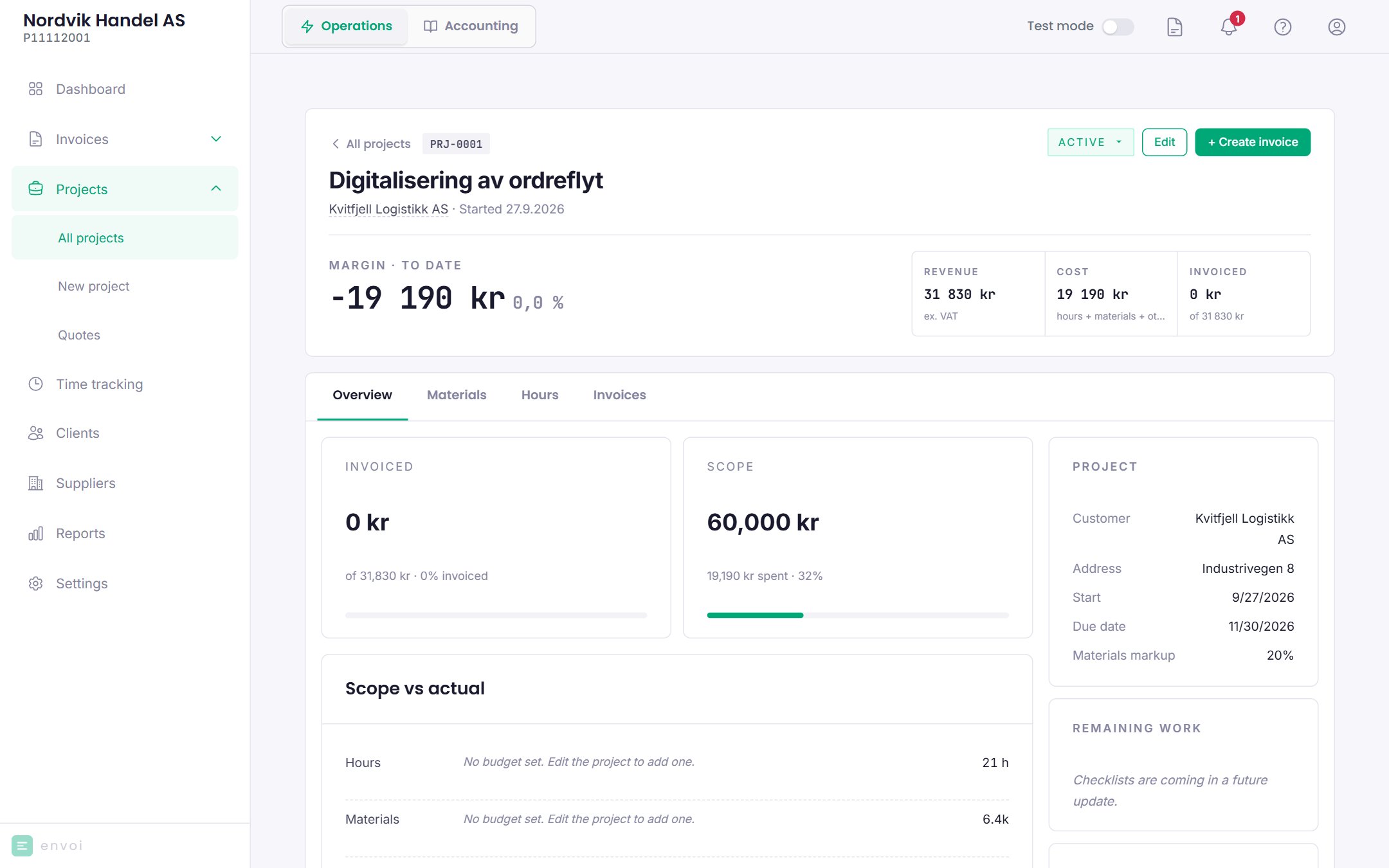
 At the top you see:
* **Revenue**: the fixed price, or approved hours at customer rate and materials at customer price.
* **Cost**: hours at internal hourly cost, materials at purchase price, and other costs.
* **Invoiced**: what has been invoiced so far, excluding VAT, minus credit notes.
* **Actual margin**: invoiced minus cost. Before the first invoice it says **Nothing invoiced yet**.
* **Forecast margin**: expected margin based on the forecast, on projects that have the Forecast tab.
| Tab | What you do there |
| - | - |
| Overview | Budget against actual, activity and key figures. Owners and administrators only. |
| Materials | Add materials with purchase price, markup and how much has been used |
| Hours | Hours logged on the project. See [Time tracking](/en/prosjekter/timeforing). |
| Invoices | The invoices on the project |
| Supplier invoices | Link received invoices to the project. The amount excluding VAT counts as a cost. |
| Forecast | Expected revenue and cost against actual, and other costs such as travel and shipping |
## Invoice from the project
Choose **Create invoice**. Envoi creates an invoice draft with:
* **Materials** that have been used and not invoiced, at customer price.
* **Hours** that are approved, billable to the customer and not invoiced.
Hours waiting for approval are not included. Envoi shows how many are waiting. Other costs are not included on the invoice.
On fixed price projects, Envoi creates one line with what remains of the fixed price. You can invoice part of the amount, but not more than the fixed price in total.
If you want to close the project at the same time, choose **Close project**. The project then gets the status **Done**.
The invoice is a draft. Review it and send it as usual. See [Invoices](/en/salg/fakturaer).
The hours and materials on the draft are locked until the draft is sent or deleted, and the lines cannot be changed on the invoice. If you want to change them, create the draft again from the project. A credit note for the whole invoice releases them again.
## Who can do what
* Everyone on the team sees all projects, and can create new ones.
* Members can only change projects they created themselves.
* Only owners and administrators can change the forecast and add other costs.
A project cannot be deleted. Set it to **Cancelled** instead.
At the top you see:
* **Revenue**: the fixed price, or approved hours at customer rate and materials at customer price.
* **Cost**: hours at internal hourly cost, materials at purchase price, and other costs.
* **Invoiced**: what has been invoiced so far, excluding VAT, minus credit notes.
* **Actual margin**: invoiced minus cost. Before the first invoice it says **Nothing invoiced yet**.
* **Forecast margin**: expected margin based on the forecast, on projects that have the Forecast tab.
| Tab | What you do there |
| - | - |
| Overview | Budget against actual, activity and key figures. Owners and administrators only. |
| Materials | Add materials with purchase price, markup and how much has been used |
| Hours | Hours logged on the project. See [Time tracking](/en/prosjekter/timeforing). |
| Invoices | The invoices on the project |
| Supplier invoices | Link received invoices to the project. The amount excluding VAT counts as a cost. |
| Forecast | Expected revenue and cost against actual, and other costs such as travel and shipping |
## Invoice from the project
Choose **Create invoice**. Envoi creates an invoice draft with:
* **Materials** that have been used and not invoiced, at customer price.
* **Hours** that are approved, billable to the customer and not invoiced.
Hours waiting for approval are not included. Envoi shows how many are waiting. Other costs are not included on the invoice.
On fixed price projects, Envoi creates one line with what remains of the fixed price. You can invoice part of the amount, but not more than the fixed price in total.
If you want to close the project at the same time, choose **Close project**. The project then gets the status **Done**.
The invoice is a draft. Review it and send it as usual. See [Invoices](/en/salg/fakturaer).
The hours and materials on the draft are locked until the draft is sent or deleted, and the lines cannot be changed on the invoice. If you want to change them, create the draft again from the project. A credit note for the whole invoice releases them again.
## Who can do what
* Everyone on the team sees all projects, and can create new ones.
* Members can only change projects they created themselves.
* Only owners and administrators can change the forecast and add other costs.
A project cannot be deleted. Set it to **Cancelled** instead.